This release updates WordPress remote code execution rule metadata in the Cloudflare Managed Ruleset and Cloudflare Free Ruleset to identify CVE-2026-65640.
Key Findings
CVE-2026-65640: A remote code execution vulnerability affecting WordPress core and plugin components. Remote, unauthenticated attackers can execute arbitrary system commands to gain unauthorized access or establish backdoors on host servers.
Impact
The WordPress changes update rule metadata only; detection behavior and actions remain unchanged.
Qwen 3.8 27B is a 27-billion-parameter instruction-tuned vision language model from Alibaba's Qwen family. It processes images and text together, with reasoning and function calling for agentic workflows.
Key capabilities:
Vision: Accept image and text inputs and generate text responses.
Reasoning: Support thinking mode for complex, step-by-step problem-solving.
Function calling: Build agents that invoke tools and APIs across multiple conversation turns.
262,144 token context window: Retain long conversations and multimodal inputs across extended agent sessions.
Use Qwen 3.8 27B through the Workers AI binding (env.AI.run()) or the REST API at /ai/run. You can also use AI Gateway with these endpoints.
DeepSeek V4 Flash and DeepSeek V4 Pro are the first Workers AI models with a full one million (1,048,576) token context window. Use them for long-horizon agentic workflows, large codebases, and multi-step reasoning that exceed the context limits of every other model hosted on the platform.
DeepSeek V4 Flash is the faster, lower-cost sibling. This release supersedes the preview version with substantially enhanced agentic capabilities.
Key capabilities:
Reasoning: Both models support thinking mode for complex, step-by-step problem-solving.
Function calling: Build agents that invoke tools and APIs across multiple conversation turns.
Long context: Both models support a full 1,048,576 token context window.
Protect an application across all its domains at once
Until now, if a Worker was reachable on a route, a Custom Domain, and a workers.dev URL, you had to manually add each one to an Access application and keep the list in sync whenever routes or domains changed.
Now, Access attaches the policy to the Worker itself, so every associated domain and preview URL stays protected even when its routes or domains change.
Protect all new and existing Workers by default
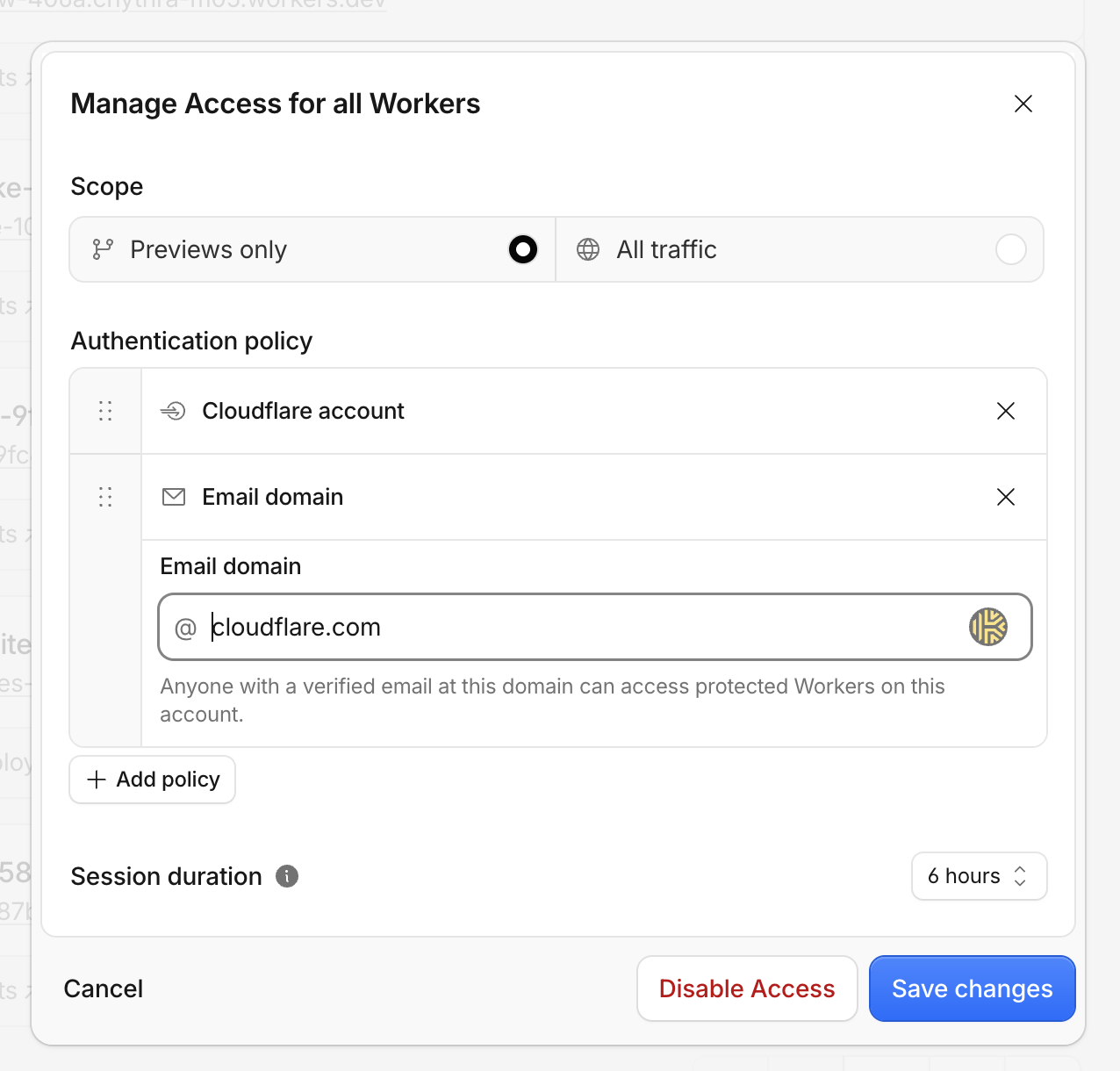
Make all Workers private by default, so every existing and newly created Worker requires sign-in before anyone can reach it.
If a specific Worker should remain publicly accessible, add a Worker-level bypass to exempt it.
Whether you protect a single application or all Workers at once, you can choose whether to protect preview deployments only or both previews and production, and control who can sign in by Cloudflare account membership, email address, or email domain.
For more advanced policy options, edit the policy in Zero Trust ↗.
View all of your Worker Access policies
You can view and manage all of your Access policies in the Access tab of the Workers & Pages section in the dashboard.
See who is accessing your Worker
When Access is enabled on your Worker, every authenticated request includes ctx.access. Call ctx.access.getIdentity() to get the user's email, name, and groups — no manual JWT validation required.
export default { async fetch(request, env, ctx) { if (!ctx.access) { return new Response("Access did not run", { status: 401 }); } const identity = await ctx.access.getIdentity(); return Response.json({ aud: ctx.access.aud, email: identity?.email }); },};
Test Access locally
You can now test Cloudflare Access locally with wrangler dev. Add a dev block to your wrangler.jsonc:
Your Worker will receive this identity through ctx.access and ctx.access.getIdentity(), letting you test authenticated and unauthenticated flows without deploying. Remove the dev block to simulate unauthenticated requests.
API and programmatic access
You can also set up these policies through the Workers API instead of the dashboard.
Artifacts now supports jurisdictions, allowing you to select the European Union or the United States as the only location where repo data is stored and processed.
Select a jurisdiction when you create a namespace. Every repo in that namespace automatically uses the selected jurisdiction.
Cloudflare Gateway can now detect software package downloads and give you policy control over supply chain traffic. When a developer or CI/CD pipeline downloads a package through Gateway, the proxy identifies the registry protocol from the request URL and extracts the package ecosystem, name, version, and namespace. You can then write HTTP policies using pkg.* selectors to allow or block package downloads.
Supported ecosystems
Gateway detects package downloads for the following ecosystems:
Ecosystem
Namespace
npm
Scope (for example, @babel)
PyPI
--
RubyGems
--
Cargo
--
Go
Module path
Maven
Group ID
NuGet
--
Selectors
In the dashboard, select Package Ecosystem to access the package registry selectors. After selecting a single ecosystem, nested fields for package name, version, and namespace become available. Five pkg.* selectors are available for HTTP policies with the Allow and Block actions:
Selector
Description
pkg.ecosystem
The package ecosystem detected from the request URL.
pkg.name
The package name extracted from the download URL.
pkg.version
The package version, with support for ecosystem-aware comparison operators.
pkg.namespace
The package namespace, when the ecosystem supports one.
pkg.purl
The Package URL (PURL) ↗ derived from the detected coordinates. Available in the API only.
Detection is based on the registry protocol rather than the hostname, so it works the same way whether traffic goes to a public registry, a corporate proxy such as Artifactory or Nexus, or a self-hosted mirror.
Package registry security requires TLS decryption to be turned on.
Cloudflare Realtime SFU is a WebRTC selective forwarding unit that runs on Cloudflare's global network. It forwards audio, video, and application data between WebRTC clients without requiring you to manage SFU infrastructure or regions.
DataChannels are WebRTC channels for application messages. A client publishes a named DataChannel to Realtime SFU, and the SFU forwards its messages to every client that subscribes to that channel. Use DataChannels for low-latency payloads such as chat messages, game state, sensor updates, and control events.
What changed
Realtime SFU DataChannels now support unordered and partially reliable delivery. DataChannels remain reliable and ordered by default, so existing channels keep their current behavior.
With ordered delivery, a delayed message can block later messages. For game state or sensor updates, recent data may be more useful than recovering an older message. Unordered delivery lets later messages proceed, while partial reliability limits retransmission attempts or delivery time.
Choose delivery behavior
Delivery settings answer two questions: whether newer messages can bypass a delayed message, and when the transport should stop retrying delivery.
Choose the policy that matches how long your payload remains useful:
Goal
Settings
Use when
Reliable, ordered delivery (default)
Omit ordered, maxRetransmits, and maxPacketLifeTime
Messages remain useful and must arrive in order
Reliable, unordered delivery
Set ordered: false; omit both retry fields
Messages remain useful, but later messages should not wait for earlier messages
No retries or ordering
Set ordered: false and maxRetransmits: 0
The application tolerates message loss and discards out-of-date updates
Limited retries
Set maxRetransmits: <COUNT>
Brief recovery is useful, but repeated retries are not
Time-bounded delivery
Set maxPacketLifeTime: <MILLISECONDS>
A message loses value after a known time window
ordered controls ordering independently from retries. maxRetransmits and maxPacketLifeTime are alternative retry budgets, so set at most one for each channel. Omit both for reliable delivery, whether ordered or unordered.
Apply the policy end to end
Realtime DataChannels use negotiated IDs, so browsers do not receive delivery settings from the remote peer. Apply the same settings when the publisher creates the local channel, each subscriber pulls the remote channel, and each client calls createDataChannel().
In the publisher and subscriber clients, create the negotiated browser DataChannel with the same settings. In this example, pc is the active RTCPeerConnection, and channelId is the ID returned by the corresponding API request:
Certificate Transparency Monitoring is now generally available ↗ across all Cloudflare plans.
Alerts for certificates Cloudflare issues on your behalf (Universal SSL renewals, backup certificates, Advanced Certificate Manager, Total TLS) are now automatically filtered out. Alert emails are also clearer and more actionable, with structured certificate details and a direct link to manage CT Monitoring in the Cloudflare dashboard.
Cloudflare Email security now lets administrators write their own content-based blocking rules. A new Blocked content area under Policies & rules lets you define a plaintext string or a regular expression, choose whether to scan the message subject, body, or both, and automatically block any message that matches.
Create rules using either plaintext matches or regular expressions — useful for blocking targeted phishing campaigns, known-bad phrases, or content patterns unique to your organization.
Choose the search location for each rule: subject, body, or subject and body.
Use the built-in regular expression checker to validate your pattern against sample text before saving, so you can confirm the rule matches what you expect and avoid false positives.
Matching messages are marked with a malicious disposition and prevented from reaching users' inboxes.
Blocked content rules currently only support the block action.
This feature is available for the following Email security packages:
Infrastructure applications support independent multi-factor authentication (MFA) with FIDO2 keys. You can allow ssh_fido2_key, piv_key, or both in application-level and policy-level MFA settings.
Users enroll FIDO2 keys through the App Launcher and connect with the generated SSH identity. FIDO2 keys for SSH are separate from browser-based WebAuthn security keys and Personal Identity Verification (PIV) keys.
Cloudflare Gateway now automatically detects Model Context Protocol (MCP) ↗ traffic flowing through your network. MCP is the standard protocol used by AI agents to connect to external tools and data sources. Gateway identifies MCP requests by inspecting protocol-specific headers and payload characteristics.
MCP policy selector
A new Is MCP selector (experimental.is_mcp) is available in HTTP policies. Use this selector to build Gateway rules that allow, block, or isolate MCP traffic.
This selector is currently in beta and may change before general availability.
For example, the following policy blocks MCP traffic that does not arrive through an approved MCP portal:
Selector
Operator
Value
Logic
Action
Is MCP
is
True
And
Block
Traffic Source
is not
MCP portal
AI security report
A new AI security report dashboard under Insights & Logs > Dashboards provides visibility into MCP usage across your organization. The dashboard includes:
Total MCP request volume, unique users, and unique MCP servers
A timeseries chart of unique MCP servers observed over time
A summary of Gateway policies that target MCP traffic
Gateway HTTP and Network policies now include a Traffic Source selector that identifies how traffic reaches Cloudflare. This allows administrators to write policies that target specific on-ramp methods - for example, applying different rules to traffic arriving via the Cloudflare One Client compared to traffic routed through an MCP portal or a proxy endpoint.
The selector uses the net.onramp.type API field in both HTTP and Network policies.
UI name
API example
Traffic Source
net.onramp.type == "device_client"
Browser Isolation selector
A Browser Isolation selector is also available in Network and HTTP policies. This selector identifies whether the current session is running inside Remote Browser Isolation, allowing administrators to apply different policy behavior to isolated traffic.
The Cloudflare Status page at www.cloudflarestatus.com ↗ has been rebuilt. It is available at the same address, and every previously documented Status API ↗ endpoint remains supported, so existing bookmarks, integrations, and monitoring continue to work.
Notifications that fire even when Cloudflare is down
The status page now has its own notification system, delivered independently of Cloudflare infrastructure. You can subscribe by email, webhook, Slack, Discord, or Google Chat.
The Maintenance Notification and Incident Alerts in Cloudflare Notifications remain supported, and deliver to the destinations already configured on your account.
Markdown for AI agents
Every page on the status page returns Markdown when requested with an Accept: text/markdown header, so agents can read the current status without parsing HTML:
Hostname routing ↗ is now generally available. Instead of managing static IP lists and routes, you can route traffic by hostname across multiple Cloudflare One connectors:
Cloudflare Tunnel: route a private hostname (for example, wiki.internal.local) to a private application behind your tunnel, or a public hostname (for example, bank.example.com) to egress through a specific tunnel and anchor traffic to a dedicated exit node.
Alongside GA, the default IPv4 range used for initial resolved IPs (also called token IPs) is changing from a Carrier-Grade NAT (CGNAT) range to a public Cloudflare-owned range:
Why this is changing: Starting with Chrome 142 ↗, Local Network Access (LNA) restrictions block background requests to CGNAT addresses (100.64.0.0/10), which included the previous initial resolved IP default (100.80.0.0/16). LNA is implemented at the Chromium engine level, so it affects all Chromium-based browsers (for example, Microsoft Edge, Brave, and Opera), not only Google Chrome. This could silently break hostname-based Gateway features for users of these browsers, and required Chrome Enterprise policy workarounds. The new default range is public Cloudflare address space, so it is not affected by this restriction.
What is affected: Initial resolved IPs are used by several features that associate a DNS query with the network connection that follows it:
Private and public hostname routing for Cloudflare Tunnel
You can check your account's current range, or configure a custom range, at any time from Zero Trust > Team & Resources > Devices > Device profiles, or using the Initial Resolved IP Subnet API.
For full instructions, refer to Configure initial resolved IPs. The IPv6 range (2606:4700:0cf1:4000::/64) is unchanged and is not affected by this restriction.
If you were relying on a Chrome Enterprise policy workaround (such as LocalNetworkAccessRestrictionsTemporaryOptOut) while your account was still on the legacy CGNAT-based range, refer to Google Chrome restricts access to private hostnames for next steps.
This release introduces new protection for a remote code execution vulnerability in vBulletin and improves two existing detections.
Key Findings
A new detection provides protection against vBulletin CVE-2026-61511.
Two existing detections have been improved to strengthen coverage.
Impact
Successful exploitation of CVE-2026-61511 may lead to remote code execution on affected vBulletin systems, potentially resulting in unauthorized access, data exposure, service disruption, and broader compromise of the hosting environment. Administrators are strongly encouraged to apply vendor updates and recommended mitigations.
This hotfix addresses an uncommon and intermittent case on Windows devices where the device is unable to reconnect after the device is woken from sleep.
Real-time Tunnel log streaming is now available in the Cloudflare dashboard under Networking > Tunnels. This brings the same live debugging capability previously only available in the Cloudflare One dashboard, including multi-connector aggregated streaming for high-availability deployments.
In the tunnel detail view, a new Live logs tab lets you:
Stream logs from single or multiple connectors — In highly available deployments with multiple cloudflared replicas, logs from all connectors are merged into a single stream grouped by hostname, making it easy to identify which host machine produced each log entry.
Filter by log level, event type, and HTTP method — Narrow the stream to only the events you care about (HTTP, TCP, UDP, or cloudflared internal), at any log level.
Turnstile Spin is now generally available with three setup paths for creating a Turnstile widget and wiring canonical server-side siteverify into your existing backend. Start in the dashboard, with Wrangler, or from your AI coding agent. All three paths create the same widget. You can complete the integration by hand or have your agent embed the widget, wire siteverify, and validate it.
Server-side verification
Turnstile setup has two parts: embed the widget in your frontend, then call siteverify from your backend. Without the second part, the widget appears on the page but does not protect the request.
The skill includes insertion snippets for Next.js (App Router and Pages Router), Astro, SvelteKit, Hugo, and vanilla HTML. For other frameworks, the agent proposes a generic pattern and asks you to confirm it first.
The Turnstile dashboard flags existing widgets with no matching siteverify traffic. Select Fix with Spin to copy a prompt that guides your agent through wiring siteverify into your backend.
Before finishing, the agent runs a real Turnstile token through your protected endpoint, checks that it passes, then replays the token to confirm the endpoint rejects it on the second try. If a check fails, the agent stops and shows you where.
Run Spin
You can run Spin three ways:
In the Turnstile dashboard, select Set up with Spin, enter your domains, then select Set up. Spin creates the widget and returns the sitekey, secret, and a prompt for your agent.
From the Wrangler CLI, run wrangler turnstile widget create. Wrangler prints the sitekey and secret. You wire the frontend and siteverify by hand.
From your AI coding agent, paste the Spin prompt into Claude Code, Cursor, Codex, OpenCode, or GitHub Copilot Chat. Your agent fetches the skill, creates the widget, then embeds it and wires siteverify.
Workers AI and AI Gateway now provide a unified path for accessing models and managing inference traffic. Use the same AI binding and REST API to call models hosted on Workers AI or by supported third-party providers, with AI Gateway providing observability, logging, caching, security, and billing controls.
Unified entrypoints and observability
The AI binding supports both Workers AI and third-party models through env.AI.run(). The REST API provides shared /ai/ endpoints with Cloudflare authentication across providers.
Route a Workers AI request through AI Gateway by specifying a gateway ID. Use default to automatically create a gateway on the first authenticated request, or specify an existing gateway to separate applications and workloads:
const response = await env.AI.run( "@cf/zai-org/glm-5.2", { messages: [{ role: "user", content: "What is the capital of France?" }], }, { gateway: { id: "default" }, },);
const response = await env.AI.run( "@cf/zai-org/glm-5.2", { messages: [{ role: "user", content: "What is the capital of France?" }], }, { gateway: { id: "default" }, },);
Requests routed through AI Gateway can be logged and included in analytics for request volume, errors, latency, token usage, and costs. You can also configure controls such as caching, rate limiting, and request retries on the gateway.
Unified billing and higher rate limits
You can now use prepaid AI Gateway credits to pay for Workers AI inference. This provides one credit balance for Workers AI and supported third-party model providers. To use credits for Workers AI, set the gateway's Workers AI billing setting to Unified billing. Workers AI requests routed through that gateway deduct from your credit balance in real time.
Prepaid credits also provide access to the following Workers AI frontier models without requiring the Workers Paid plan. Each frontier Workers AI model has a rate limit of 50 requests per minute per account, per model when billed with AI Gateway credits, compared to 20 requests per minute through standard Workers AI billing:
Support for MySQL in Hyperdrive is now generally available. You can connect to any MySQL database from your Workers using Hyperdrive.
Hyperdrive makes your regional, MySQL databases fast when connecting from Cloudflare Workers. It eliminates unnecessary network roundtrips during connection setup, pools database connections globally, and can cache query results to provide the fastest possible response times.
You can connect using your existing drivers, ORMs, and query builders with Hyperdrive's secure credentials, with no code changes required. MySQL support is available at the same pricing as Postgres.
Cloudflare Mesh nodes can now run as Docker containers. The cloudflare/mesh ↗ image is available on Docker Hub for Docker Compose, Kubernetes, and any OCI-compatible runtime — no host-level package installation required.
The image supports amd64 and arm64 architectures and includes built-in source NAT so return traffic routes correctly without VPC route table changes.
Deployment patterns
Docker Compose — add a cloudflare-mesh service to your compose.yaml and connect your entire stack to a private network.
Kubernetes StatefulSet — deploy a standalone Mesh node with persistent registration state.
Kubernetes sidecar — add the Mesh image as a sidecar container in a Pod to connect an application to Cloudflare without application changes.
CI/CD — pull the image in a pipeline step, join the Mesh, run integration tests against private infrastructure, and tear down. The node disappears when the container exits.
For high availability, run multiple replicas with the same Mesh node token. Cloudflare operates replicas in active-passive mode with automatic failover.
Radar expands its Routing section ↗ with two widgets on AS pages, such as AS13335 ↗, that describe how a network reaches the rest of the Internet: the paths it takes toward the Tier-1 ↗ networks, and the mix of direct upstreams carrying its routes. Both are derived from RouteViews ↗ RIB snapshots, unioned across selected collectors.
AS-level connectivity
The AS-level connectivity graph aggregates the BGP paths an AS uses to reach the Tier-1 networks, unioned across all the prefixes it announces, as observed by selected RouteViews collectors. It reads from left to right, starting at the queried AS and ending at the Tier-1 networks, and each node is labeled with its AS number, country, and organization name. Tier-1 nodes are marked so they stand apart from the intermediate networks that lead to them.
By default, the graph shows the network's direct connections to Tier-1 networks plus the indirect paths, which keeps the view readable. A Show full paths toggle expands it to every observed path, including transit through Tier-1 networks the AS already connects to. An IP version selector switches between IPv4 and IPv6, because the paths reaching Tier-1 networks may differ between the two address families.
This is the AS-level counterpart to the Real-time connectivity graph on prefix pages, such as the one for 1.1.1.0/24 ↗. Instead of covering a single prefix, it covers the union of paths for all prefixes an AS announces, which makes it a fast way to read a network's transit hierarchy: which providers it depends on, how many hops separate it from the core, and whether its paths to the core are diverse or concentrated. For more information on the prefix-level graph, refer to BGP real-time routes.
Upstream providers
The Upstream providers widget tracks the share of an AS's observed paths carried by each of its direct upstream networks over time, drawn as a stacked area chart. Up to 10 upstreams appear as their own series and the remaining ones are grouped into Other. Transit changes such as adding a provider, dropping one, or moving traffic between them appear as movement between bands rather than as a single aggregate number. As with the connectivity graph, an IP version selector switches between IPv4 and IPv6.
API endpoints
The data behind both widgets is also available through two new endpoints on the BGP API:
/bgp/routes/paths/{asn} — Returns the ordered AS path segments an AS uses to reach the Tier-1 networks, each with its observed path count, peer count, and contributing collectors, alongside the name and country of every ASN in the response. Pass collector to scope the result to a single RouteViews collector.
/bgp/routes/upstreams/{asn}/timeseries — Returns the share of an AS's observed paths carried by each direct upstream over time. Use limit to control how many upstreams come back as separate series before the rest are grouped into an OTHER series, and ipVersion to select the address family.
Visit the AS13335 routing page ↗ to explore both widgets, or swap in any other AS number.
Cloudflare Radar now includes Radar Researcher ↗, a beta AI-powered assistant for exploring Internet trends and traffic data in plain language. Open Researcher from the header on any Radar page to ask questions by voice or text, receive explanations, and view interactive charts based on Radar API data.
To ask about a specific chart, select Explain with AI to start a conversation with its underlying data and context.
You can explore further with suggested follow-up questions, find earlier conversations through searchable history, and share conversations through shareable links.
Alongside the user-facing Researcher experience, Radar now supports WebMCP, allowing browser-based AI agents to navigate Radar, search data, and use tools such as URL scanning and domain lookup.